TRIBU-CR
How to register in TRIBU-CR: steps, requirements, and mistakes to avoid
A practical guide to the exact steps, required documents, and most common registration mistakes in Hacienda’s new tax platform.
Author
Kontafico team
Updated
4/2/2026
Reviewed
Editorial and tax context
Informational content for Costa Rica. Review specific tax or accounting decisions with your accountant before filing.
Quick answer
A practical guide to the exact steps, required documents, and most common registration mistakes in Hacienda’s new tax platform.
Requirements to prepare before you start
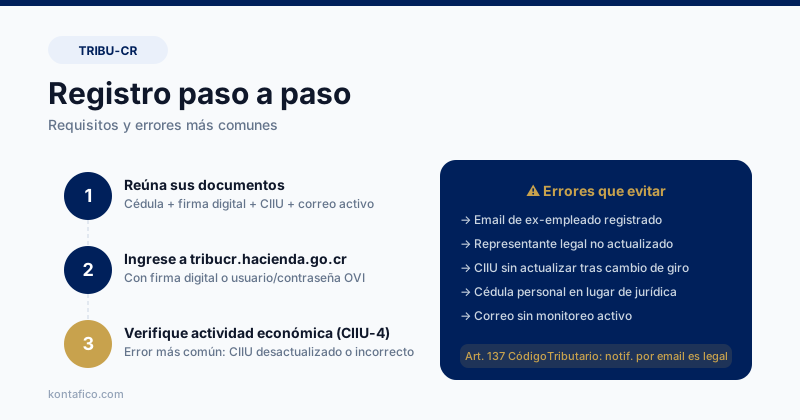
Before registering, make sure you have the legal representative’s identification, a valid digital signature or prior OVI credentials, the company tax ID, the current CIIU activity code, and a corporate email account.
If your company does not yet have a digital signature, you can request it through BCCR or authorized banks. This step often adds a few business days to the process.
A detail many teams overlook is that the registered activity code must match the business’s real operation, otherwise TRIBU-CR may flag inconsistencies later.
Step 1: Access the platform and create the taxpayer profile
Go to tribucr.hacienda.go.cr and sign in either with your digital certificate or with the user credentials previously used in OVI.
Complete the taxpayer profile with legal name, tax address, economic activity, and the email that will serve as the official tax notification address.
If you are acting for a company, make sure the person signing in is the active legal representative or an authorized proxy with proper registry support.
Step 2: Review the digital tax file
Once registered, review the company’s digital tax file to see historical returns, open periods, notices, and prior adjustments.
It is common to find old periods that appear pending even though the company believes they were already addressed. Confirm the real status with your accountant.
If the company had inactive periods or special regimes, document them correctly so the system does not interpret them as omissions.
Step 3: Set up the filing calendar
Use the platform to identify the company’s active obligations and map them to internal responsibilities.
Share that calendar with your accountant so the team knows who prepares data, who reviews it, and who actually files each return.
The most common delays and errors
A major mistake is registering a personal email instead of a supervised company email. If that person leaves, your notices leave with them.
Another common problem is failing to update information after a change in directors, legal representative, or tax address.
The registration process also slows down when legal name, business activity, and tax address are inconsistent across official records.
Set up TRIBU-CR in an organized way from day one
Keep invoices, expenses, and reports in order so your accountant always has reliable information ready for each filing.
Try KontaficoFrequently asked questions
Do I need an accountant to register in TRIBU-CR?
It is not mandatory, but it is highly recommended. An accountant can confirm your activity code, review the tax file, and spot pending issues before they become a bigger problem.
Can I appoint an employee or outside firm to manage TRIBU-CR?
Yes, as long as there is valid legal authorization. What matters most is that the official notice email remains under company control.
How long does registration take?
If you already have the certificate, company data, and activity code ready, the platform setup can be completed quickly. The biggest delays usually come from missing signature credentials or inconsistent prior records.